


Change your password

  • August 24, 2020
  • 2 comments
  • 1706 views

Slido Team
Forum|alt.badge.img

You can change your password from your profile menu.


To change your current password:

  1. Log in and click the icon with your initials in the upper right
  2. Select EDIT next to your name
  3. Click the Change password tab
  4. Fill in the fields and select Change password
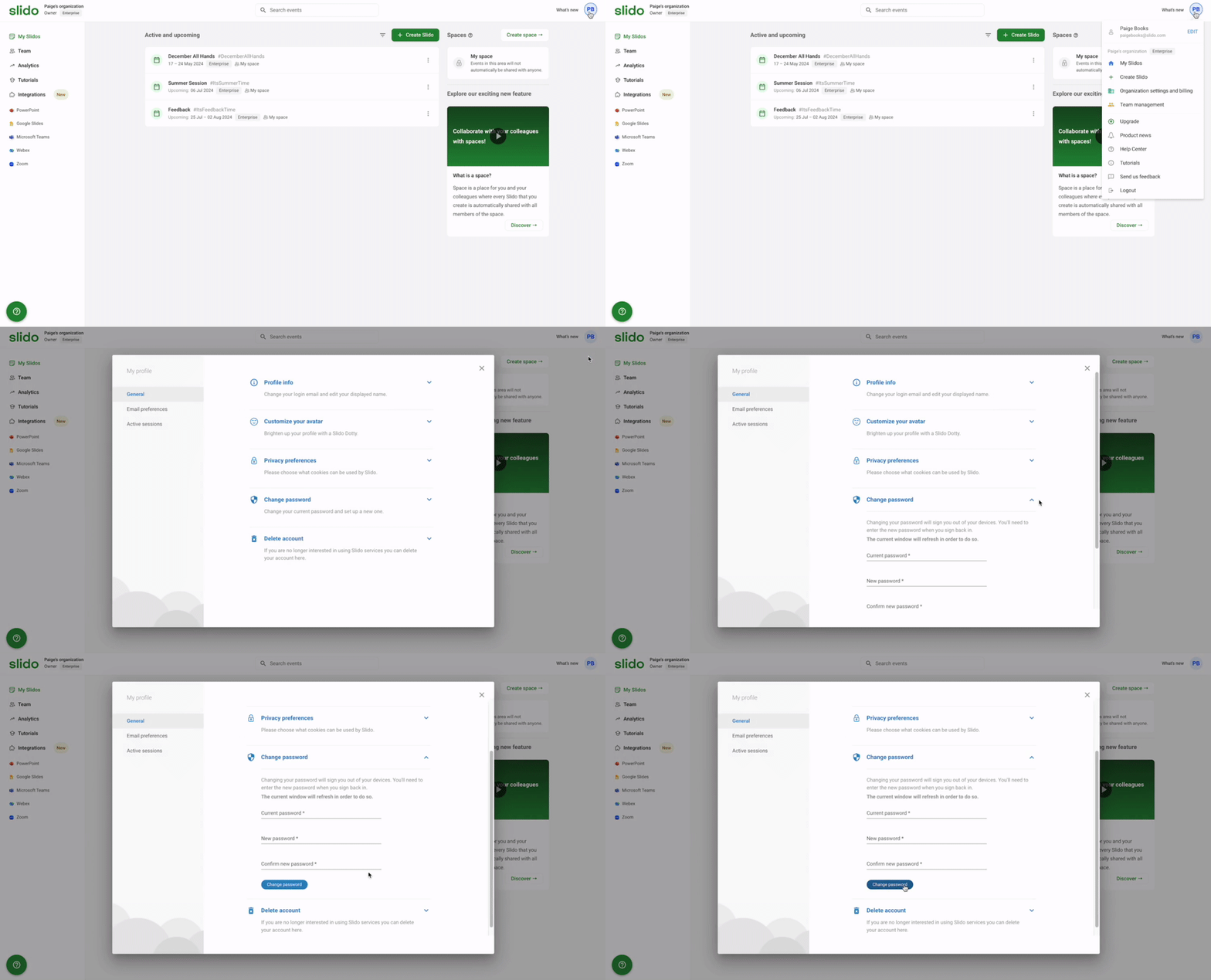
     
Change your password from your Profile menu


​Changing your password will sign you out of your devices. You'll need to enter the new password when you sign back in.


If you created your account with Google or SAML SSO, the option to change your password will not be available to you. 


Curious about more?


2 replies

  • Participant
  • May 28, 2024

Hi! I log through my email, but it requires a paswword. I want to change that password but the app does not allow to change it, because my email a Google mail. 

What can I do to change the password? 


Ondrej from Slido
Forum|alt.badge.img

Hello @Rosi Ulloa 

would it be possible to reach our support@slido.com team? They would be able to look at your account and help with any requested changes.