
Solved

How can I install Slido for PowerPoint without admin password prompt on macOS?

  • November 5, 2025
  • 6 comments
  • 110 views

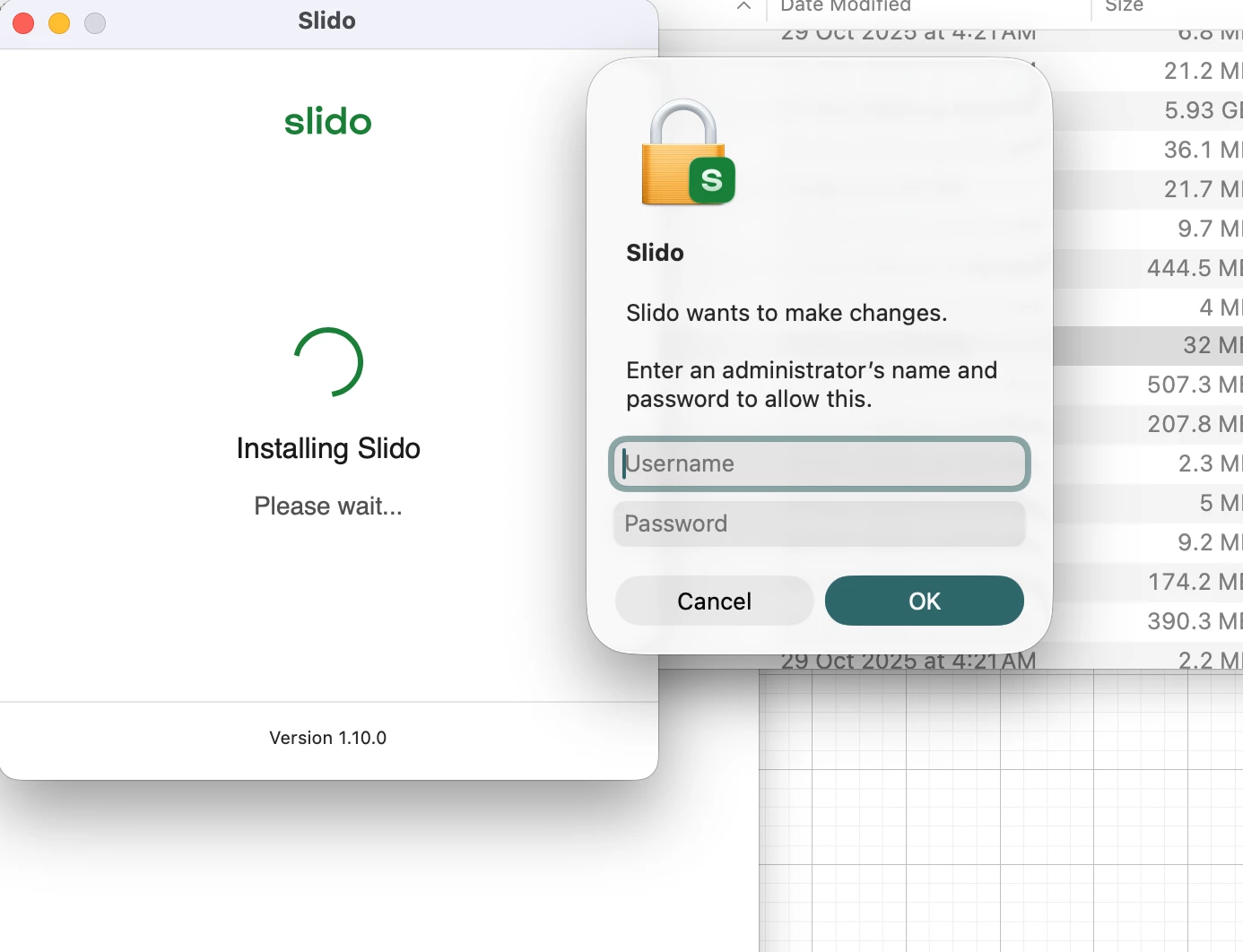
We would like to silent install Slido for Powerpoint on macOS and without being prompted for an admin password. We use Jamf to deploy the app, I followed the instructions to silent install, used the command but as soon as the user launches the app, it prompts for admin password. Please let me know if there is a way to suppress it or bypass it. The admin prompt says that ‘Slido wants to make changes. Enter admin password.’

Best answer by Kat from Slido

Hello ​@hyderas 

I’m sorry to see you’re running into issue with the installation. Our post installation step does not require administrative rights.The user can run the Slido app at any time to get support and to ensure it is registered to PowerPoint correctly.

As admins, you can deploy Slido using the steps in our article. Admins can finish the registration to PowerPoint on behalf of the user using our command. The command must be run in the context of the user account. Command to finish the installation:

/Applications/Slido.app/Contents/MacOS/Slido -RunType install -Silent true

If you still experience issues with the installation, please, reach out to our support team directly. They’ll be happy to take a closer look and take it from there. 

Thank you so much!

All the best, 
6 replies

  • Author
  • Participant
  • November 6, 2025

This is what I get on my test machine. The command “/Applications/Slido.app/Contents/MacOS/Slido -RunType install -Silent true” doesn’t help


Kat from Slido
Forum|alt.badge.img
  • Customer Care
  • Answer
  • November 6, 2025

Hello ​@hyderas 

I’m sorry to see you’re running into issue with the installation. Our post installation step does not require administrative rights.The user can run the Slido app at any time to get support and to ensure it is registered to PowerPoint correctly.

As admins, you can deploy Slido using the steps in our article. Admins can finish the registration to PowerPoint on behalf of the user using our command. The command must be run in the context of the user account. Command to finish the installation:

/Applications/Slido.app/Contents/MacOS/Slido -RunType install -Silent true

If you still experience issues with the installation, please, reach out to our support team directly. They’ll be happy to take a closer look and take it from there. 

Thank you so much!

All the best, 


  • Author
  • Participant
  • November 6, 2025

Thank you ​@Kat from Slido for your prompt response! I added the post-install command to the Jamf policy to make it work.  


  • Participant
  • May 6, 2026

Thank you ​@Kat from Slido for your prompt response! I added the post-install command to the Jamf policy to make it work.  

Hello!  Would you mind sharing your Jamf workflow, please?  When I attempt to deploy it, based off the directions in the KB, I cannot even get it to install Slido.app to the /Applications folder.


Forum|alt.badge.img

Hi ​@PhillipOtt.

Slido for Mac can be installed with JAMF, using the standard method for distributing apps packaged in the DMG image. You can just copy the Slido.app to the /Applications folder.

The user will be able to run Slido and use it in PowerPoint afterwards.

We also support a command line option to integrate with PowerPoint, so the user doesn’t have to run the Slido app for the first time.  The command must be run in the context of the user account.  The command to finish the installation is below:

/Applications/Slido.app/Contents/MacOS/Slido -RunType install -Silent true
 

If there are operational issues deploying with JAMF, I would recommend contacting JAMF Support.

I hope that helps!


  • Participant
  • May 7, 2026

Hello Jennifer,

Unfortunately, when I try to deploy the .dmg file using Jamf, it reports as installing successfully, but Slido.app does not appear to be in /Applications.  I attempted to contact support using the slido.com/contact form, but it throws an error. I have attempted this with multiple browsers.  This is why I asked ​@hyderas what their workflow was, so that I could see if they were doing something differently.  I do not normally have these issues deploying applications via Jamf.

Thank you.