

Answer

Answers are not revealing when in Survey

  • September 24, 2025
  • 2 comments
  • 42 views

I would like to have a couple of poll questions be asked at the same time. I put them in “survey” to do that. I selected Poll Settings for each and selected “Mark Correct Answer” (which I did). However, when practicing and viewing the Participant View, I cannot get the answer to be revealed. I close the voting, then choose the eye so that the answer is shown, but it never is. What am I doing wrong?


Thanks!
Best answer by Lucia from Slido

Hi ​@KSB 

Thank you for your question!

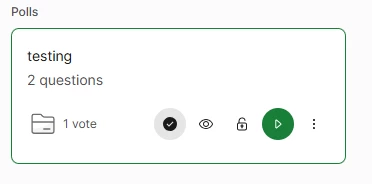
To show the correct answer on top of how people voted, you would need to also enable that on top of the eye icon. You need to click on the tick icon right next to it.

You can do this right from the start, or later if you wish to make it a reveal.

Hope this helps!

2 replies

Forum|alt.badge.img

Hi ​@KSB 

Thank you for your question!

To show the correct answer on top of how people voted, you would need to also enable that on top of the eye icon. You need to click on the tick icon right next to it.

You can do this right from the start, or later if you wish to make it a reveal.

Hope this helps!


  • Author
  • Participant
  • October 7, 2025

Thanks! I also realized you have to enable that on EACH question when it is a survey, not just on the survey as a whole.