Answer

Data analytics when using duplicated sessions

  • February 13, 2025
  • 4 comments
  • 44 views

Hi, we’re running the same training session multiple times and would ideally like to collect data within each session as well as across all sessions. Is this possible when using the ‘duplicate’ option, or is there a better option? I looked at multiple rooms but I’m not sure if this can be 1 room per session which equates to multiple rooms as it’s across multiple sessions. The slido is being used in a PowerPoint presentation. Thanks!

Best answer by Sophia from Slido

Hi ​@Caviar,

If you're running the same training session multiple times, you can collect data specific to each Slido session. However, it's not possible to bulk download all data across different sessions at once.

The Multiple Rooms feature, available in our Professional plan and higher, lets you create different 'rooms' within a single Slido session-each with its own polling and Q&A. This could be the best option for efficiently downloading all collected data while keeping separate training sessions, especially when using PowerPoint integration.

I hope this helps!😊

4 replies

Forum|alt.badge.img

Hi ​@Caviar,

If you're running the same training session multiple times, you can collect data specific to each Slido session. However, it's not possible to bulk download all data across different sessions at once.

The Multiple Rooms feature, available in our Professional plan and higher, lets you create different 'rooms' within a single Slido session-each with its own polling and Q&A. This could be the best option for efficiently downloading all collected data while keeping separate training sessions, especially when using PowerPoint integration.

I hope this helps!😊


Hello, 

I’m trying to setup Slido for use in a training course that’s integrated into power point. I need to be able to reuse the same slido questions, in the same power point by multiple instructors. How can I set the power point to be easily opened and maintain the Slido “Slide” locations in the power point, and also gather data analytics when reusing the same power point? I’ve tried setting up multiple rooms as well as multiple Slidos, and I can’t seem to make either work the way I need it too.

Thank you,


Mika from Slido
Forum|alt.badge.img

Hello ​@Steve Butterfield

Mikaella here from Slido -  happy to help! 😊

Gotcha! I appreciate the info about your set up. First things first, all your instructors would need to download the slido for powerpoint integration and also be invited as free co-host  into the slido session with multiple room.

Now with the set up of your powerpoint presentation, you can only link one room at a time to your presentation. What I can suggest is either:

  • If the instructors are presenting at the same time, I would create a presentation per instructor and they can run the slido event on their own with their own presentation ( I recommend this option)
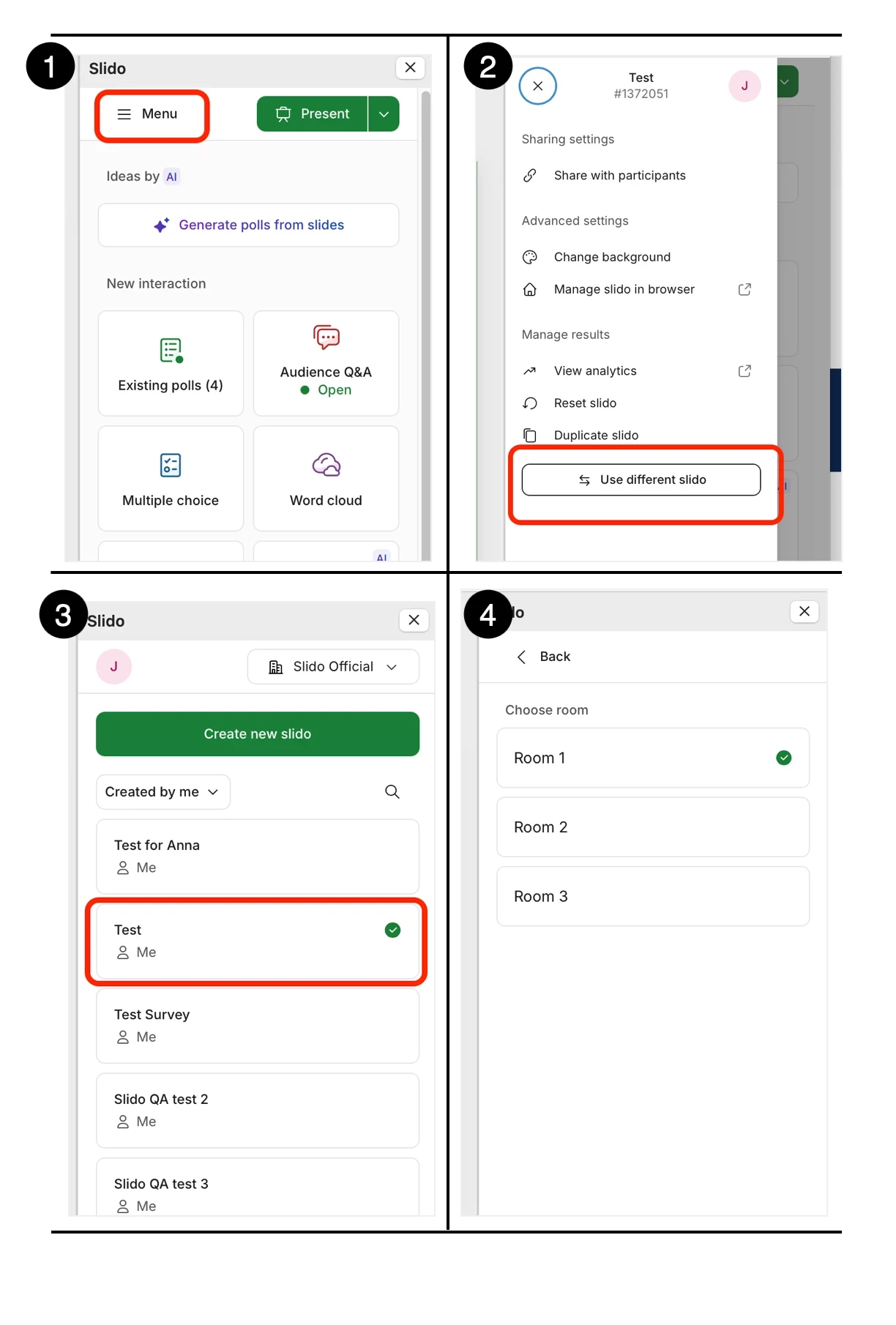
  • If the instructors are presenting at different times like one after the other as an example, you can switch rooms within your slido powerpoint presentation, please see the below as an example of the steps:


I would highly recommend using one presentation per instructor, this gives your instructors the flexibility to own their own presentation and work on their slidos with little involvement from the event owner. I hope this set up helps! 

Let me know if you have anymore questions! 

My best, 
Mikaella from slido 


Thanks you for your help. I’ll work on this setup and give it a try.