Answer

How an I change the Font of the Question?

  • March 10, 2025
  • 8 comments
  • 151 views

How can I change the font of the question?

Best answer by Kat from Slido

Hello ​@Emad Massoud 

We currently don’t have a feature which allows for Font or Size changes in Slido. My apologies for that. However, I’ll be happy to forward this to our product team as feature request. You can also check for any Slido updates at our Product News page.

Thank you for your understanding. 

Best,

8 replies

Kat from Slido
Forum|alt.badge.img
  • Customer Care
  • Answer
  • March 10, 2025

Hello ​@Emad Massoud 

We currently don’t have a feature which allows for Font or Size changes in Slido. My apologies for that. However, I’ll be happy to forward this to our product team as feature request. You can also check for any Slido updates at our Product News page.

Thank you for your understanding. 

Best,


  • Participant
  • September 3, 2025

Adding my voice to the request for having the option to increase or decrease the font size in slido. The room I am presenting in is large, with a fairly small screen. So people sitting in the back can’t read the questions. I’m having to read them outloud to everyone in the room. This seems like a very basic feature that could be added to the settings page and govern all of the slidos under a persons account. They could then adjust the font size to fit the room in question for an entire set of slidos.


Robert.


Mika from Slido
Forum|alt.badge.img

Hello ​@Robert Nissen

Thank you so much for voicing your request, we’re shared this with our product team for future developments. 

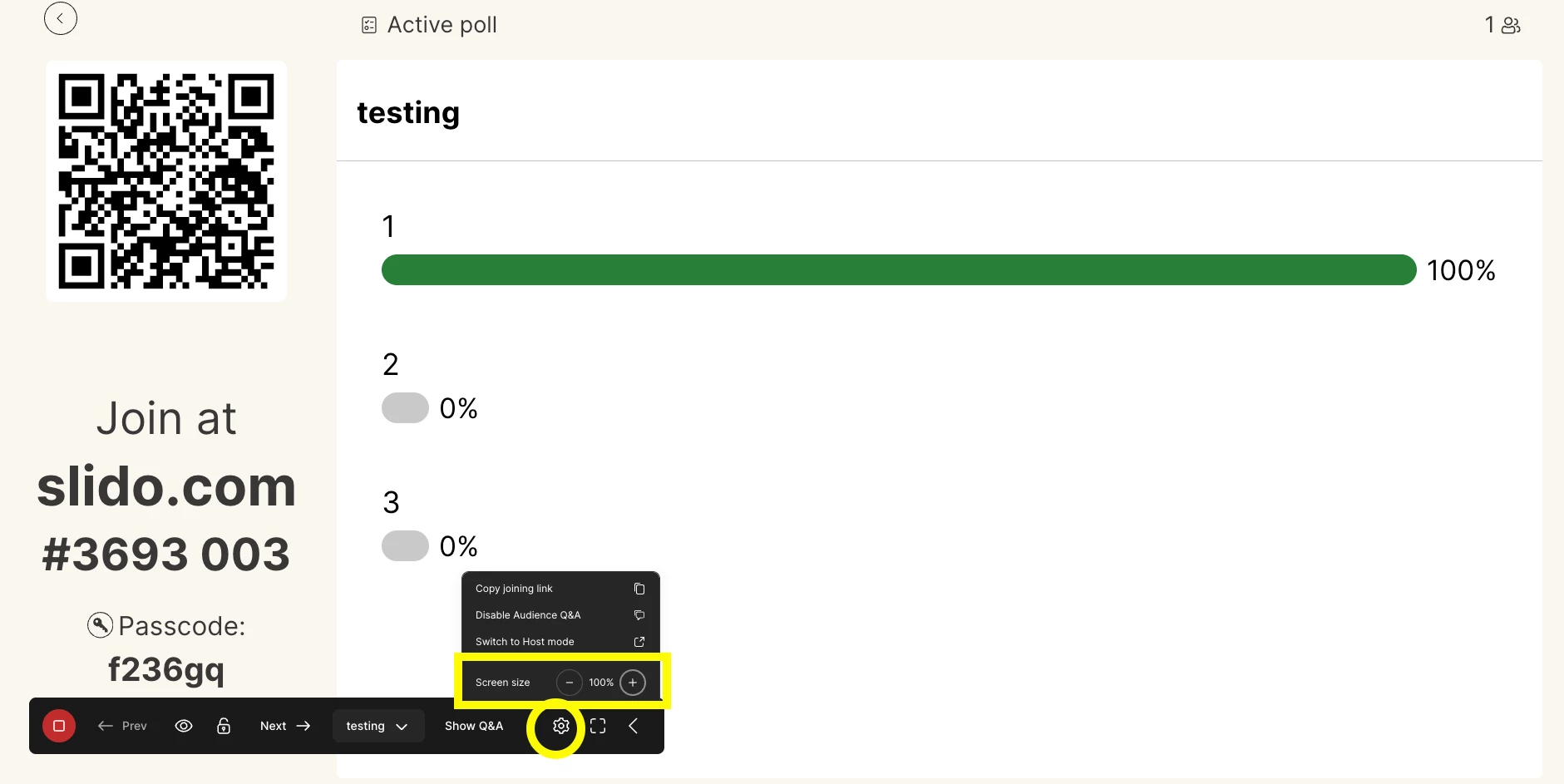
You can use the + or - to increase or decrease your font size, when presenting with slido, however I can understand if you need to adjust this more. I hope this works for you. 

Let me know if you have anymore questions! 
My best, 
Mikaella from slido 


  • Participant
  • September 4, 2025

I am using Slido to do Think-Pair-Share interactions within powerpoint, which is used for the vast majority of my content. There does not appear to be any option to make edits to them within PPT, or to change the font or screen size. The Slido slides even warn me not to try.

Robert.


Adrian from Slido
Forum|alt.badge.img

Hi ​@Robert Nissen

Great question! When you insert a Slido interaction into PowerPoint, the slide itself is just a placeholder. The look, font size, and formatting aren’t editable directly in PPT.

Instead, the styling comes from your event theme in Slido:

  • Log in at slido.com

  • Go to Event settings → Customization → Theme

  • There you can adjust colors, logo, and background. (depending on your plan)

Fonts are standardized across Slido to keep the display responsive and consistent across devices, so you won’t see options for custom font size or typeface. Hope that helps! 


All the best,


Forum|alt.badge.img

Hi ​@Robert Nissen 

We appreciate the feedback and can understand how it would be useful to have this type of function. We will pass the feedback onto the product team. 

All the best,

Monica from Slido


  • Participant
  • September 9, 2025

Hi :)


Has the product Team included the feature since your last update?


Best wishes, 

Lily


Forum|alt.badge.img

Hi ​@Lilsterer !

There’s been no update around this, I’m not sure if our team is considering this currently.  However, if you’d like to subscribe to product news it would be there if it becomes available 😊