Solved

Is it possible to moderate Word Clouds and Open Text polls?

  • November 26, 2024
  • 6 comments
  • 285 views

We love using Slido for online learning with school children. However the word cloud feature has been problematic as we can’t find a moderation option before an answer appears on the screen.
Is there anything that can be done to help with this? Our young people may not submit profanities, but they may type in silly things. Once one silly answer appears on the screen it diminishes the quality of Slido.


We can use Q/A which does have moderation, but we really like the functionality of the word cloud for single word answers. 


Thanks!

 

Best answer by Carly from Slido

Hey ​@AnneFrank ,

You’re right in that the Q&A is the only feature which has true moderation available. Word clouds do have profanity filters enabled by default which filters out bad and inappropriate words, but I understand that this may not stop silly or nonsensical answers. 


With that said, there may be a workaround for both word clouds and open text polls. What you can do is set up your polls so that the responses are hidden. This allows you to preview all of the submissions before other participants see them. Here you can actually delete any that you deem inappropriate. Then when you’re ready, you can lock the voting so that no more responses can come in. And finally you can reveal or unhide the results. 


I hope that helps!

Best,

6 replies

Carly from Slido
Forum|alt.badge.img

Hey ​@AnneFrank ,

You’re right in that the Q&A is the only feature which has true moderation available. Word clouds do have profanity filters enabled by default which filters out bad and inappropriate words, but I understand that this may not stop silly or nonsensical answers. 


With that said, there may be a workaround for both word clouds and open text polls. What you can do is set up your polls so that the responses are hidden. This allows you to preview all of the submissions before other participants see them. Here you can actually delete any that you deem inappropriate. Then when you’re ready, you can lock the voting so that no more responses can come in. And finally you can reveal or unhide the results. 


I hope that helps!

Best,


Hi jumping on this after googling looking for the solution for a similar problem.

Is there a way additional filtering can be put on when you create the cloud so certain words cannot be added ? 

Or is the only way you can moderate is to set it up so they have to add their name, so then when you see the ‘silly comments’ you know who made them ?

Working with teenagers whilst trying to measure impact - the struggle is real !!!!


Forum|alt.badge.img

Hi ​@Elaine McCulloch 

We currently do not have any additional settings for filtering. One option I would recommend using is also deleting submissions that are inappropriate like this.

Hope this helps a little!


Not quite the same, but thanks for the steer.

Perhaps something that can be explored in the future.

A list of words or phrases you can type in that would not show on screen.

Thanks 


Hello, so far the product seems promising. I teach a large lecture first-year college class of over 150 students and so I’m considering buying the higher level of access to cover them, but so far the only viable tools are the word clouds and multiple choice questions.

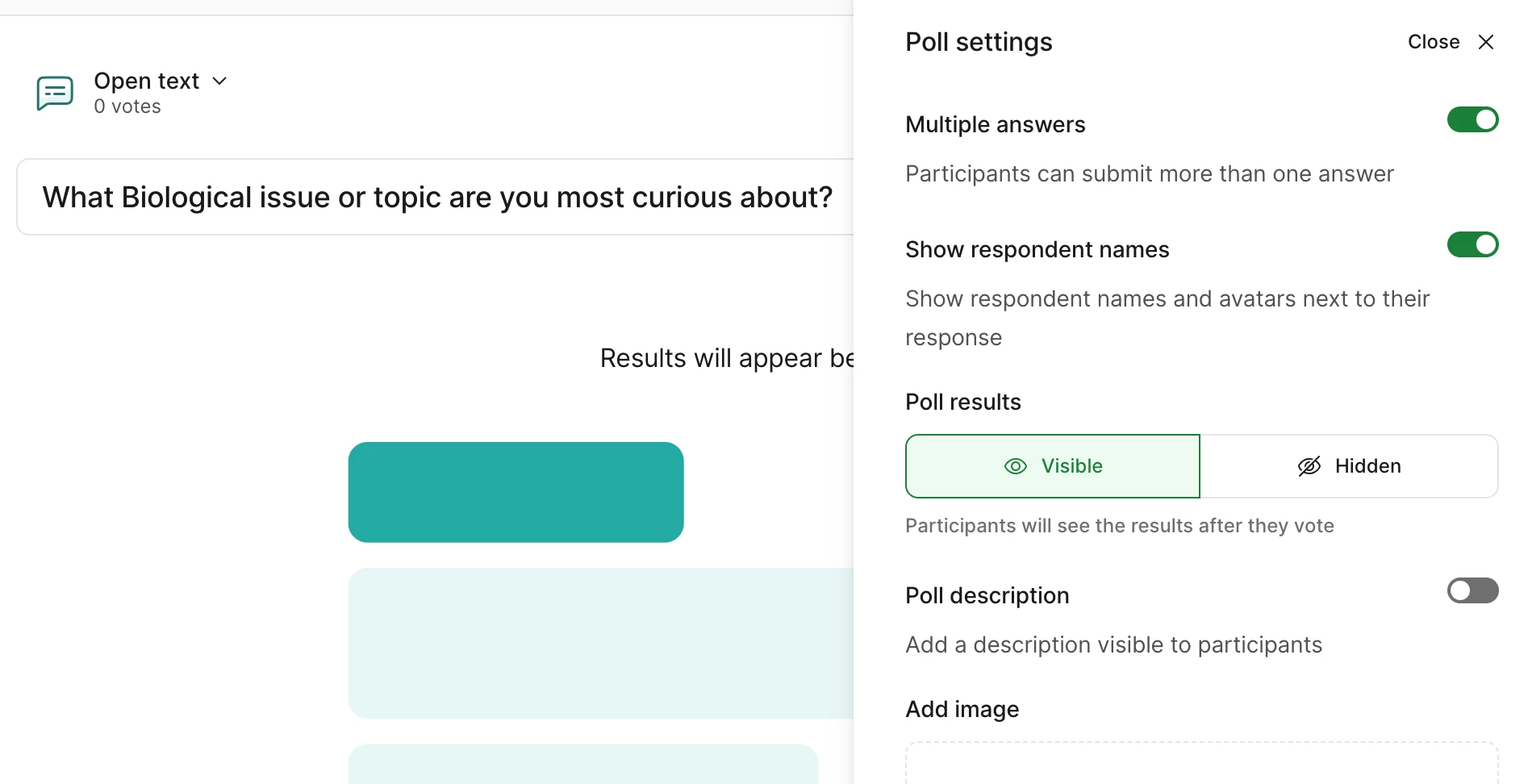
I’d really like to see the profanity filter added to the “Open Text” polls. My testing finds it is definitely NOT active by default, and I don’t see an option to turn it on (I can see it for word clouds). This is as viewed on Mac and in Powerpoint, with test submissions from my cell phone as a mock student. The only real choice I see is to have respondent names appear next to what they submit, but I don’t think that will sufficiently deter college-level teenagers from going for the lols.


Screenshot attached so you can see what I see in the options (absence of a profanity filter choice):


Mika from Slido
Forum|alt.badge.img

Hello ​@Robert Nissen

Mikaella here from Slido -  happy to help! 😊

Thank you so much for sharing your use case about your students. I’m afraid we don’t have a profanity filter for our Open text poll. I can see how helpful it can be in your situation and will share it as a feature request with our product team for future developments. 

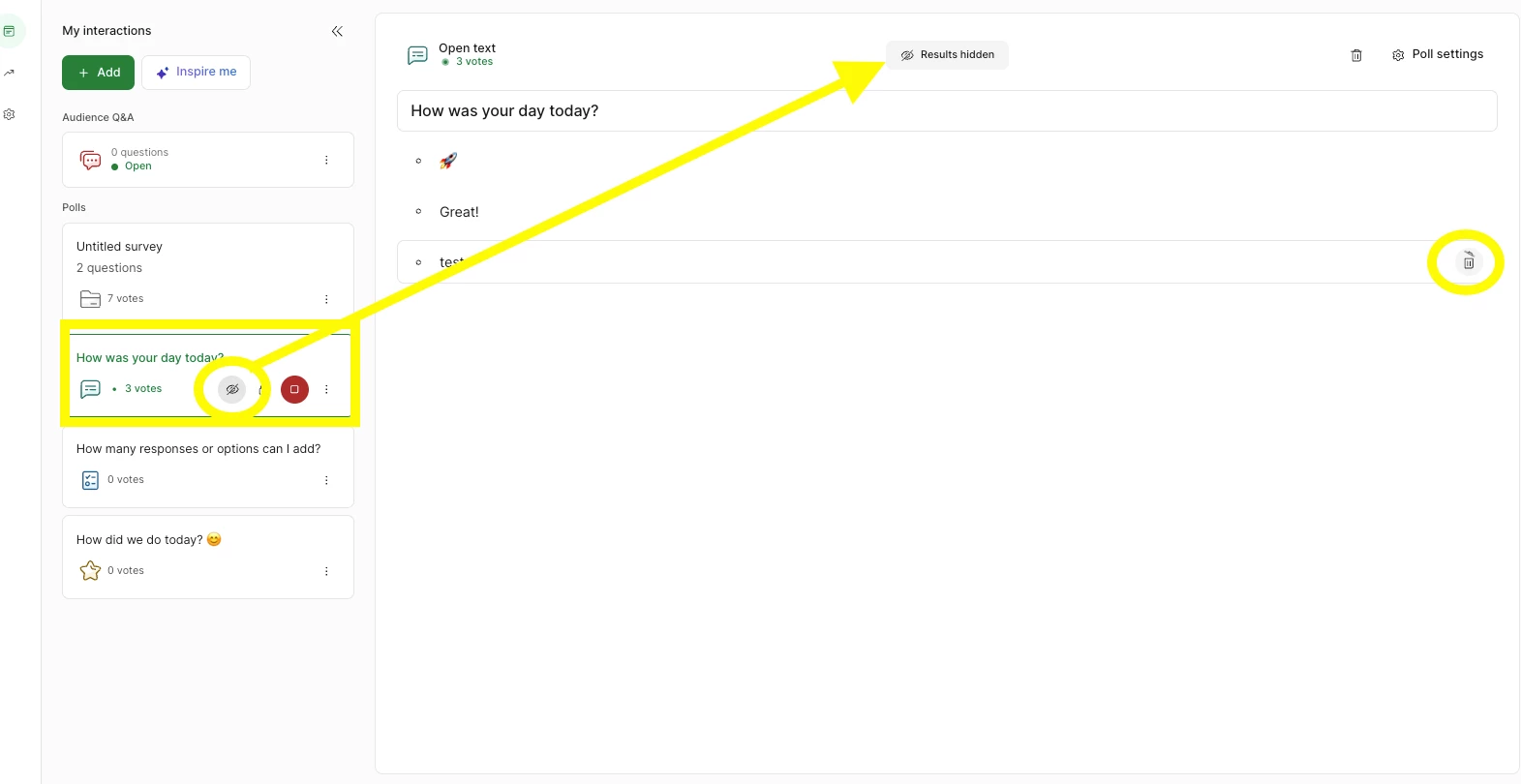
As a workaround, you can hide the results for Open text poll and then delete any inappropriate responses, please see the attached image below. As an extra helpful tip to simply avoid your students from responding this way, we recommend “Always require name” being enabled. I hope this helps. 

Let me know if you have anymore questions! 

My best, 
Mikaella from slido