

Answer

Slido not working after update

  • October 1, 2025
  • 4 comments
  • 64 views

I had Slido v1.18.0.6804 installed and worked well in powerpoint. After I quit Powerpoint, it updated to V1.18.0.6918 and is no longer working. The ribbon button is not showing properly and nothing happens when I click it
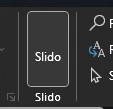


When I run the slideshow, the startup slide presents like this

instead of the showing the QR code. The palette is also not showing. I have my presentation in two weeks.


Best answer by Christyn from Slido

Hi ​@Pottsy1980!

Would you reach out to support@slido.com?  If you can send the powerpoint logs, that would be helpful as well!

4 replies

Forum|alt.badge.img

Hi ​@Pottsy1980!

Would you reach out to support@slido.com?  If you can send the powerpoint logs, that would be helpful as well!


I have the same issue, what’s the fix?


Adrian from Slido
Forum|alt.badge.img

Hi ​@jordan.jarrett

We’ve found the issue could be the version installed or it could be clashing with another add-in. Would you reach out to support@slido.com? Please also send the powerpoint logs, as this helps us narrow down a possible solution.

All the best,


Joel from Slido
Forum|alt.badge.img

Hi everyone 👋

If anyone else runs into this issue again, please make sure you’ve downloaded the latest Slido for PowerPoint version (get it here). And if you still have problems with the button not displaying, double-check that you’re not also running the bluebeam add-in. That particular add-in is known to interfere with ours and you may need to disable it.

Otherwise, please contact our support team if any issues persist.


Thanks!