



Slido’s AI features are designed to enhance the user experience of both hosts and participants 🚀
And because Slido is committed to providing Enterprise-level security features, we make it easy for organization owners and admins to disable/enable these features under their license.
Learn about how Slido AI handles data processing and prioritizes privacy and security in the Slido AI Transparency Technical Note.
In this article:
How to disable/enable AI features
The ability to disable AI features is only available for owners and admins of paid annual plans.
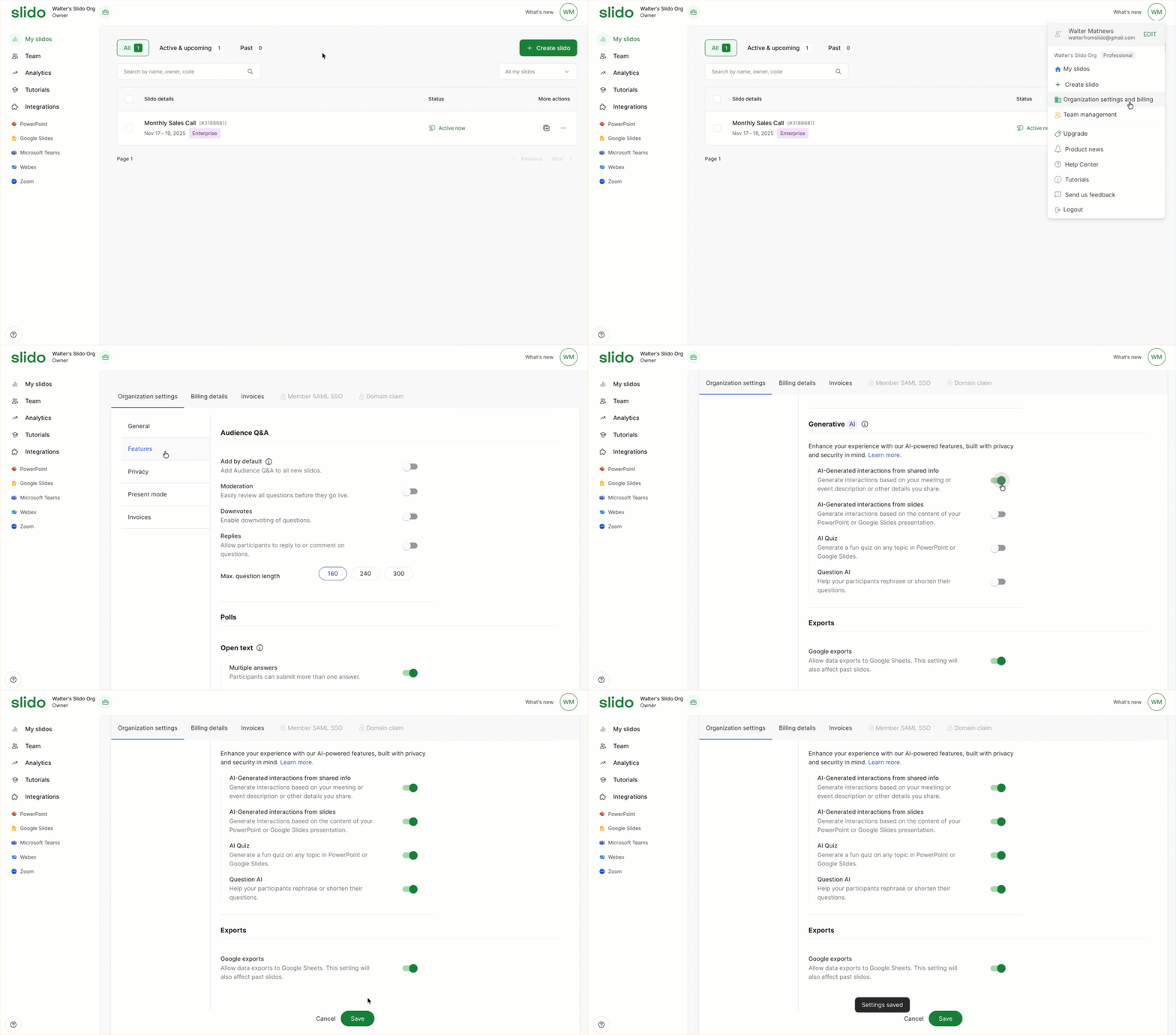
To disable or enable AI features for your organization:
- Click on your avatar in the upper right corner and select Organization settings and billing
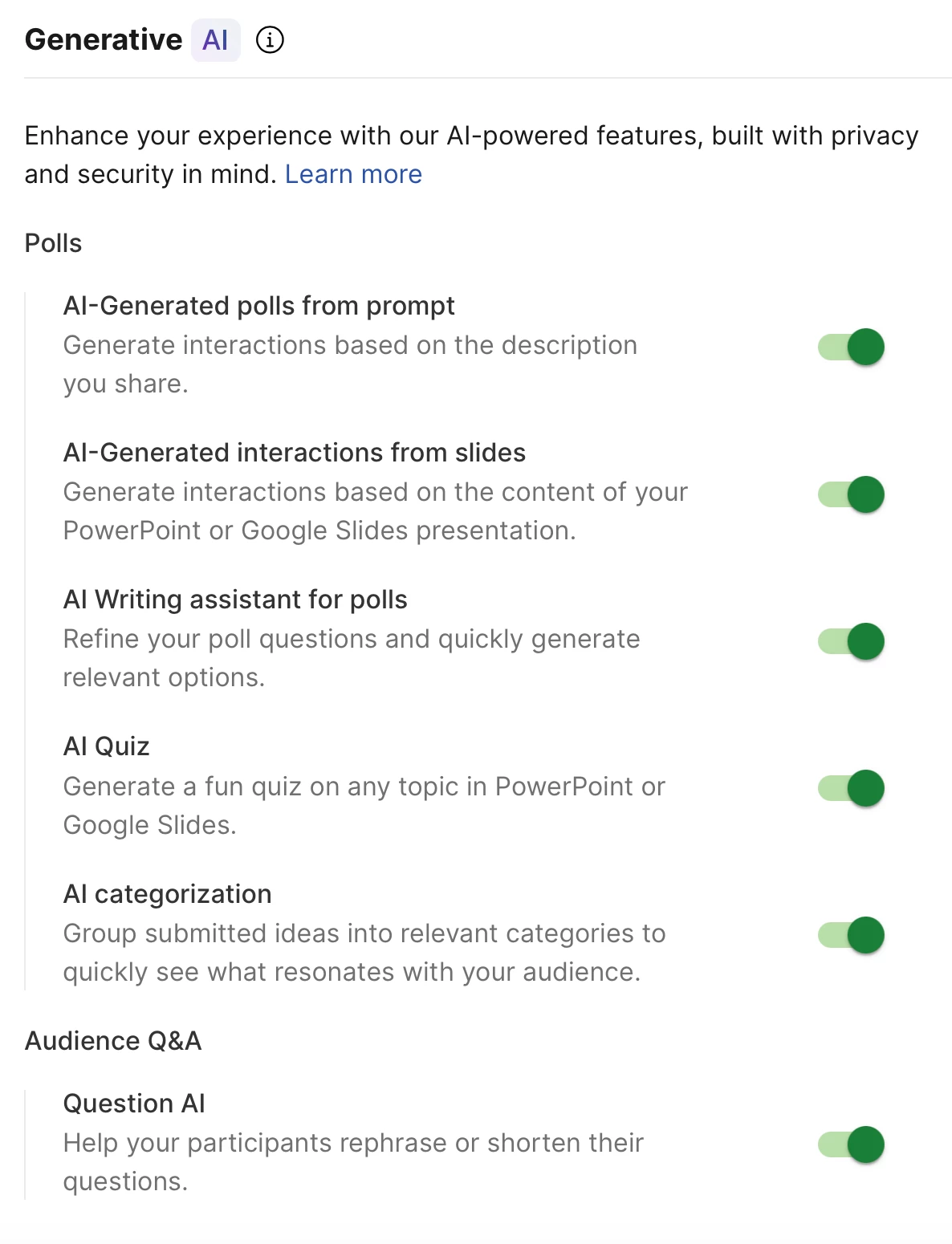
- Select Features and scroll down to Generative AI
- Choose to Enable or Disable any settings and select Save
What are Slido’s AI features?
AI-Generated polls in Host mode
From Slido Host mode, you can prompt Slido AI to create relevant polls for your meeting or event in seconds. Available in all Slido plans – learn more in our AI-Generated polls in Host mode guide.
Note that in your Generative AI settings, this feature is listed as AI-Generated polls from prompt. This is because in the future, the Slido AI prompt may extend beyond Host mode into other integrations.
AI-Generated polls from slides
With AI-Generated polls from slides, Slido AI generates polls in seconds based on the content of your PowerPoint or Google Slides presentation. Available in all Slido plans – learn more in our AI-Generated polls from slides guide.
Note that in your Generative AI settings, this feature is listed as AI-Generated interactions from slides. This is because in the future, Slido AI may generate other interactions besides polls based on your presentation.
AI Writing assistant for polls
Use Slido AI to help refine your poll text, in order to get the most out of your interactions. Plus, it can come up with multiple choice and ranking answer options in seconds. Available in all Slido plans – learn more in our AI Writing assistant for polls guide.
AI Quiz
Presenters using PowerPoint or Google Slides can now create quizzes on any topic in seconds. With AI Quiz, you get an entire quiz generated by AI – saving you time and effort. Available in all Slido plans – learn more in our AI Quiz guide.
AI categorization
Use an ideas poll to brainstorm with your team. Then let AI categorization instantly make sense of the submissions by finding and grouping together similar ideas or common themes. Available in all Slido plans – learn more in our Ideas poll guide.
Question AI
Question AI enhances how participants interact with Slido Q&A. It offers assistance in refining, shortening and generating alternative versions of their questions with one simple click. Available in all Slido plans – learn more in our Question AI guide.
FAQs
Find quick answers below and check out the Slido AI Transparency Technical Note for more details.
Will my Slido data be stored and used afterwards?
Data from paid Slido plans will not be stored or used at all. Data from Basic plans will be anonymized and may be used to improve services.
Where is my data processed?
Slido AI features are currently powered by Cisco AI technologies and also by third-party large language models (LLM) – which are provided by the Microsoft Azure OpenAI Service.
What happens when there is a feature update?
Product updates and improvements will always be included in release documents. If an update is significant, we may use email notification and Slido Community to inform users about it.
What AI model is being used?
Slido AI features use GPT3.5-Turbo, GPT-4, and/or GPT-4o via the Microsoft Azure OpenAI Service API to generate the output.
We want to hear from you!
Share your feedback with us and let us know how we can improve these features. And if you have ideas of how we can utilize AI even further within Slido, you can let us know that, too!