
Answer

Slido PPT APP Issue

  • August 25, 2025
  • 5 comments
  • 124 views

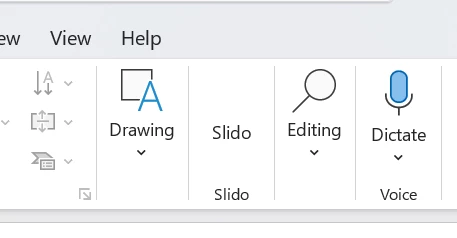
Slido PPT APP icon showing incorrectly as below, also no response after click on the icon 
 

Best answer by Lucia from Slido

Hi ​@Krystal gao 

We’re aware of the issue and our development team is actively working on a fix. 

In the meantime, you can download the previous add-in version here.  You'll be prompted to update (unless you have auto updates disabled) when there is a release with the fix.

Thank you for your patience.  Please let us know if you have any other questions!

5 replies

Forum|alt.badge.img

Hi ​@Krystal gao 

We’re aware of the issue and our development team is actively working on a fix. 

In the meantime, you can download the previous add-in version here.  You'll be prompted to update (unless you have auto updates disabled) when there is a release with the fix.

Thank you for your patience.  Please let us know if you have any other questions!


  • Author
  • Participant
  • August 25, 2025

Thank you so much! The previous version is now working perfectly.


  • Participant
  • September 3, 2025

Are there any updates on fixing this? I’m having the same issue. I tried uninstalling Slido then downloading the previous add-in version and it does not work. Please advise! 


Mika from Slido
Forum|alt.badge.img

Hey ​@Kayla Doyel

Mikaella here from Slido -  happy to help! 😊

Sorry this didn't work for you.

Our dev team is actively working on this and will release it when it’s 100% ready. If it didn't work for you, can you kindly let us know what exactly happens to support@slido.com  and we can assist you from there?

I would recommend sharing your logs so we can see if there is anything else that could be preventing the update to show on your end. 

Let me know if you have anymore questions! 

My best, 
Mikaella from slido 


Joel from Slido
Forum|alt.badge.img

Hi everyone 👋

If anyone else runs into this issue again, please make sure you’ve downloaded the latest Slido for PowerPoint version (get it here). And if you still have problems with the button not displaying, double-check that you’re not also running the bluebeam add-in. That particular add-in is known to interfere with ours and you may need to disable it.

Otherwise, please contact our support team if any issues persist.


Thanks!

