

Answer

Deactive Slido during webex

  • October 15, 2025
  • 1 reply
  • 27 views

I am running a 5 hour session, we are hosting several Slidos during the session.  I just ran two of my 7 Slidos, I completed the Slidos and deactivated them. I then wanted to turn on a timer, but it said my Slido was still active and I couldn’t activate the Time has I had reached my App limit. I can I deactivate Slido so I can run a timer and then go back to Slido to run the next question?
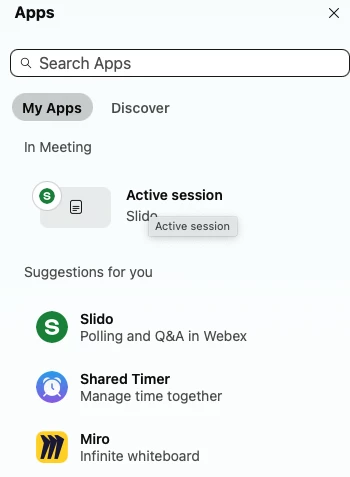
Screen shot below. I need the session to NOT be active to I can run a shared timer.


Best answer by Christyn from Slido

Hi ​@hhimes!

If you have Q&A in the meeting enabled, I would try removing this. And the active session should remove from the meeting.

You should also be able to swap back and forth between the apps in Webex.  It sounds like your Webex account may have a limit to the number of apps you can open or some different set up. So if the above doesn’t help, I would reach out to your Webex admin or Webex support and see if they can assist!

1 reply

Forum|alt.badge.img

Hi ​@hhimes!

If you have Q&A in the meeting enabled, I would try removing this. And the active session should remove from the meeting.

You should also be able to swap back and forth between the apps in Webex.  It sounds like your Webex account may have a limit to the number of apps you can open or some different set up. So if the above doesn’t help, I would reach out to your Webex admin or Webex support and see if they can assist!