



Important update
You can download invoices dated January 1, 2023 or later directly in Slido under:
Host mode → Organisation settings → Invoices.
Invoices issued before January 1, 2023 are no longer available in your Slido account.
If you need an older invoice, please contact our support team and they’ll be happy to help.
Where was your plan purchased?
A number of new US customers complete checkout through Cisco Store. Your Slido plan works in the same way, but billing and subscription management may happen in a different place.
- If your order confirmation or invoice is from Cisco Systems, Inc., follow the Cisco Store instructions.
- If it is from Slido s.r.o., follow the Slido instructions below.
- Not sure? Check the company named on your order confirmation or invoice.
Once you successfully make a payment for a Slido plan, your invoice and order details will be attached to the email we send within a few minutes of your upgrade. However, you can always find your invoices within your Organization settings.
- Navigate to your profile menu in the top-right corner
- Select Organization settings and billing
- Go to the Invoices tab
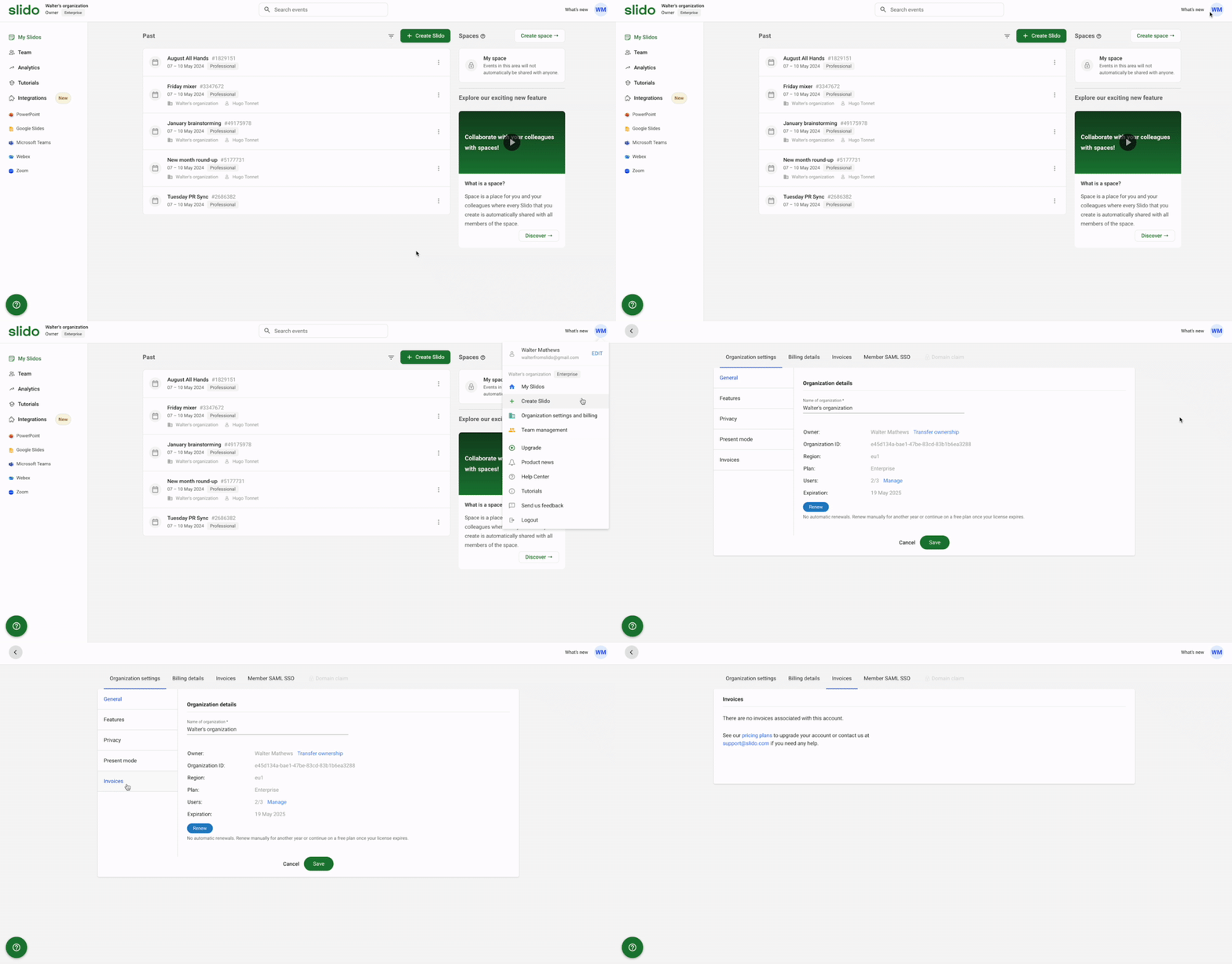
If you purchased your plan through Cisco Store then you will find your invoices in Cisco Store Account Manager.
If you purchased your plan directly through Slido then your credit card information is not stored and our invoices also serve as receipts.
Brand new invoices can take up to 15 minutes to appear within your Organization settings.
Curious about learning more?