The Slido blog is available again
Get some inspiration from your fellow Slido users on anything from use cases to how they run their meetings!
Recently active
What is the Slido Knowledge Base? The Slido Knowledge Base is an online resource designed to help you and your team use Slido efficiently and effectively. It serves as a comprehensive guide where you and your license members can quickly find answers, learn new tips, and discover best practices. Download the Slido Knowledge Base and get started today Why use the Knowledge Base?Quick access to information: With it, you can easily find the information you need to answer common questions and address any challenges – ensuring smooth and efficient use of Slido. Empower your team: By sharing the Knowledge Base with your license members, you’re equipping them to troubleshoot and explore new features on their own – leading to increased adoption and satisfaction. Maximize value: The resources included will help you unlock the full potential of Slido, enhancing your teams’ ability to promote interaction and engagement with their audiences How to use the Knowledge Base?Share the URL: Share th
Slido is a versatile engagement tool for any training, meeting, or presentation. Its endless use cases make it valuable for many different roles within an organization. This guide outlines the value Slido can bring to specific departments and teams in your organization: Communications & Executive Assistants HR and Marketing teams Team Leads L&D Specialists and Trainers Employee Experience and Onboarding Specialists Communications & Executive Assistants Colleagues working in these teams and departments are responsible for organizing and running large scale leadership meetings. Slido can support them to achieve the high stakes objectives of their meetings – such as strategic planning, team alignment, and information distribution for your entire workforce. Slido’s live polls will provide real time insights on whether your employees understood a new strategy, or paid attention throughout a meeting. Plus, our market leading Q&A will support transparent communication betwee
Are you a Slido license owner or admin looking to enhance user adoption in your organization? We've designed a 45-minute customizable training template to help your users explore Slido’s features, practice Q&A sessions, and engage their audiences with live polls. While Slido, itself, is intuitive, delivering content while managing multiple tools can be complex. Running this training session ensures your team has the knowledge and hands-on experience needed to create a seamless and engaging meeting experience. Why use this template? The template is customizable to fit your organization’s unique needs and offers interactive elements for hands-on learning. It ensures that people gain confidence to use Slido effectively in their meetings. Tips for success Audience: Use this with new users or anyone else needing a refresher.Promotion: Share your session details widely or list them on your internal learning platform.Delivery: Combine PowerPoint or Google Slides with integrations for vide
Hello everyone,I thought I’d share a creative solution our team uses to integrate Slido into a live broadcasting environment, along with some suggestions for future feature development. For context:Microsoft Teams and Zoom are excellent tools for collaborative meetings but fall short when it comes to broadcasting. Our team hosts hour-long live video training sessions that include participant interaction and a Q&A segment afterward.Privacy is crucial for our audience, which makes Slido such a great fit. In the work we do, most participants prefer not to share their camera feed but still want to interact with the facilitator live on screen.One major issue with video conferencing tools is that they compress video quality to reduce the processing load of multiple video feeds. When delivering a live event, providing the best possible visuals is essential for creating an engaging audience experience. By opting for one-way video broadcasting through platforms like YouTube, Vimeo, Castr, o
We are hosting a virtual costume contest and want attendees to vote for each of their favorite categories during the team call.What recommendations do you have to pull this off successfully? There are 5 categories for voting, including best overall. It is also impossible for us to pre-load a survey or multiple choices with names and/or voting options as the costumes will be revealed and need to be written in real-time. We are also expecting 25+ attendees, so pre-populating a multiple choice with expected names won’t be feasible.Is there a template for this use case? I am new to Slido and have currently set it up as multiple polls with word clouds, each integrated into the meeting PPT. The tutorial videos indicate the more popular words will be larger, but we prefer to see actual voting numbers (if even only me and a meeting collaborator). I am not finding how best to tabulate such results for the open text words, nor how best to export the outcomes for each poll question. Thank you!
Slido allows you to make learning an engaging and fun experience. You can encourage active participation in learning by checking for content understanding in real-time, enabling learners to ask and upvote questions, and asking for critical feedback. In this guide, you’ll learn how to use Slido to make your Trainings, Workshops and Webinars more inclusive by allowing your attendees to actively participate - whether they are remote or onsite. Common challenges Little to no interaction Unable to check for understanding Lack of inclusion How Slido can help Encourage participation Make learning effective Hear from everyone Best practices and templates Audience Q&A Icebreakers and opening polls Present facts or data in an engaging way Gauge knowledge levels and check for understanding Collect feedback Common challenges Little to no interactionDistracted learners: Attendees are easily distracted by their environment or their other devices and they can lose focus. No back and
Use Slido to help your team brainstorm their strategy, identify projects for the next quarter or crowdsource topics for upcoming events. And with Slido’s Ideas poll, you can ask AI to sort and organize submitted ideas into common categories or themes. This allows you to use your valuable meeting time for discussions and next steps – instead of simply collecting input. In this guide, you will learn how to use Slido to make your brainstorming sessions more effective, regardless of whether your team is remote or in the room. Common challenges Fear of rejection Lack of productivity Difficulty facilitating How Slido can help Enable team confidence Productive brainstorming Easier to facilitate Polls and templates Ideas poll Ranking poll Common challenges Fear of rejectionSocial anxiety: Often meeting attendees worry about what others might think about their idea so they either choose to conform or remain silent. Power dynamics: A few assertive individuals can dominate the discuss
A retrospective meeting is a unique opportunity for the whole team to get together, uncover any problematic issues, and have an open discussion about how to collaborate better. Slido enables you to interact with your team at scale, whether they are remote or onsite. It allows you to gauge team satisfaction, identify what’s going well (and what’s not), celebrate team achievements, and measure progress over time. Use this guide to learn how to use Slido at your retrospective meetings. You’ll quickly see how much more productive they can be for you and your team. Common challenges Being unaware of team satisfaction Ineffective communication Lack of progress How Slido can help Learn what people really think Effective communication Track progress Features and poll templates Satisfaction survey Polls that use start, stop, continue methodology Polls to celebrate your team heroes Celebration Quiz Common challenges Being unaware of team satisfactionUnable to capture the mood outside o
Making a decision as a team can be difficult, especially in a hybrid setup or video conferencing environment. Instead of extended back and forth discussions with people talking over one another, put an item to a vote using Slido polls. With Slido, each person has an equal opportunity to have a say – plus, you’ll see the results instantly. No matter if there are 10 or 1,000 people participating, you'll be able to collect opinions from each and every one of them – no matter if they are remote or onsite. In this guide, you will learn how to use Slido to help you simplify your team decision-making process, give everyone an equal voice, and save time while doing so. Common challenges Groupthink and internal politics Inefficiency Lack of inclusion How Slido can help Impartiality Speed and efficiency Inclusive and remote friendly Poll options and templates Ranking poll Multiple choice poll Rating poll Common challenges Groupthink and internal politicsConfirmation bias: Participants
Engaging employees during All Hands or Town Hall meetings can be a challenge. But with Slido, it’s never been easier for you to interact with your team at scale. You can ask for real-time feedback on business updates, cultivate employee buy-in, collect the best ideas, and much more. In this guide, you will learn how to use Slido to make your All Hands and Town Hall meetings more inclusive by encouraging your employees to actively participate – no matter if they are remote or onsite. Common challenges Inefficient Q&A Little to no interaction Lack of inclusion How Slido can help Make your Q&A efficient and democratic Improve alignment and build trust Foster an inclusive culture Best practices and templates Audience Q&A Icebreakers and opening polls Pulse checks Presenting numbers in a different way Collecting feedback Common challenges Inefficient Q&AA lack of meaningful questions: There may be a lack of a safe space for employees to ask honest questions and a
Learn how to make the most of your all-hands Q&A to build trust 👉
Learn how to facilitate all-hands that are engaging and inclusive 👉
Facilitating an all-hands meeting is no easy task! Discover how Slido can help you with it. This video covers some common challenges connected to all-hands meetings, sometimes known as town halls - whether it is sharing business updates in an engaging way, being able to read the room and running an inclusive Q&A.
Here are some helpful how-to guides to get you started with setting up your Slido with our integrations:
Here’s a collection of articles to help you with setting up Slido for All-hands meetings:
“Slido helped our 600-people audience feel heard throughout the conference by having a say in what questions get asked during the Q&A sessions.”Mathilde Leo, Co-founder of JAM JAM is a leading product conference to share the stories behind great products. Every year, it brings together hundreds of product managers and designers eager to hear lessons from some of the biggest brands around, including Uber, Netflix and Google. The team wanted to create an environment where the participants could learn from world-class speakers facing the same challenges as them. With this goal in mind, they built in Q&A sessions that offered enough space for such interaction. To involve everyone in the discussion, the team swapped the microphones for Slido. As a result, they managed to engage a whopping 70% of the audience in the conversation. Replacing mics with Slido to involve everyoneWhen JAM first started in 2015 with 150 participants, the organizers were using mics to take questions from th
“Slido took us from 0 to 100. Before, we only had assumptions about how many people were engaged in our team calls. Now we have facts, thanks to Slido.”Brian Davenport, VP of Service, A1 Garage Door Service A1 Garage Door Services is a growing business with 200 employees across ten U.S. states. To keep their field workers aligned and updated, they run weekly live-streamed team meetings. Some people join from 15 different offices, others are completely remote. But hosting virtual meetings comes with its challenges. “In the past, nobody would speak during the calls, and after each meeting, we got questions about things we had already explained. It seemed like people were not listening”, shares Brian Davenport, VP of Service. Brian wanted to find a way to resolve this and get people more involved during the calls. “We wanted to increase our employee engagement across the country in all of the live-streamed meetings. That's where Slido came in and helped us to increase this.” The problem:
“With Slido, we went from 5-6 employee questions received during our leadership meetings to over 100.”Jessica Kosmack, Senior Communications Specialist, Toronto Transit Commission The Toronto Transit Commission (TTC) is the third largest public transportation agency in North America. During their regular leadership meetings, all 1,600 leaders gather to share updates, discuss the latest issues and align with the organizational strategy. Traditionally, TTC did not see a high engagement during the meetings. “The meeting participants had the opportunity to ask questions but most were reluctant or perhaps not interested in putting their hands up”, explained Jessica Kosmack, Senior Communications Specialist at the TTC. To address this, the TTC leveraged Slido to get more employees to participate actively. As a result, they increased the number of questions from only a handful to over 100 and brought people’s real concerns to light. Get inspired by the TTC story. Battling low engagement durin
“Because of Slido, everyone at HUMANOO now has the same opportunity to be heard.”Maximilien A. Notter, Co-CEO, HUMANOO HUMANOO is a Berlin-based startup that offers customized, on-demand programs for its subscribers, enabling them to build sustainable healthy habits and improve their health, day by day. “We are the first ones in Europe to translate health activities into rewards, into cash. We do that by working with both companies and insurance companies, helping them to pay so-called health bonuses to their employees or insurees”, begins Maximilien A. Notter, the Co-CEO of HUMANOO. HUMANOO’s 80 plus employees are currently distributed across Berlin, Paris, and London, in a hybrid setup. As their global team continues to grow, the need for greater transparency across the company grew as well. In this story, Maximilien A. Notter, HUMANOO’s Co-CEO, tells us how Slido is helping him lay the foundations of a trust-based culture at his company. “While trying to address some concerns regard
Zoom is a video communications platform employing over 1,500 people around the globe. It’s also the second best company to work for in the US according to Glassdoor.In the last couple of years, Zoom has experienced rapid growth in terms of both customers and employees. To keep its growing and distributed workforce aligned, the company runs regular all-hands meetings. As we wanted to learn more about how Zoom runs its all-hands, we invited its Communications Manager Priscilla Barolo to our meetup in San Francisco. She let us take a peek into Zoom’s company-wide meetings and shared some of its best practices with us. Here are some of the main takeaways from the interview. Q: Priscilla, you’ve been with Zoom for six years. Do you remember when your all-hands started?They started straight away when I was an early employee. I remember there were about a dozen of us in a circle, just talking about what’s going on in the business and the industry. Q: What do your all-hands meetings look like
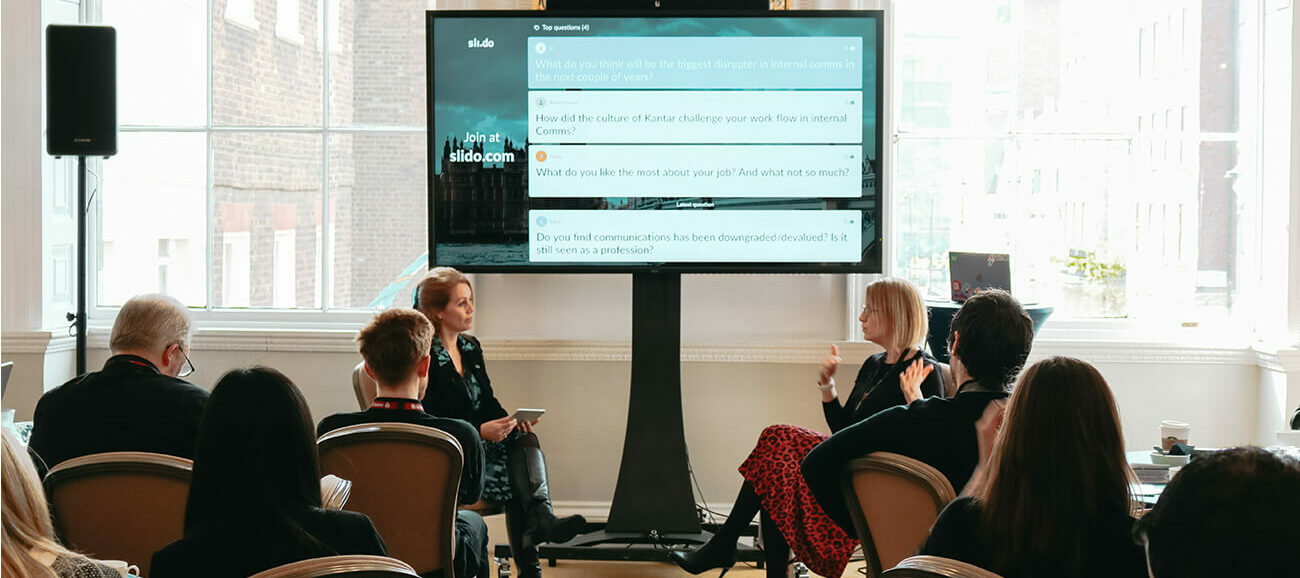
Emily Scammell is Director of Internal Communications at Onfido, an identity verification software that is currently London’s fastest-growing scale up. Emily is a highly experienced internal comms professional, having initiated and led Internal Communications for over 16 years at businesses like Virgin and Kantar.We were delighted when Emily agreed to take part in the fireside chat with our own Brand and Communications Director Kursha Woodgate at the Internal Comms Meetup in London organized by Slido. Here’s the write-up of their inspiring talk.Q: Emily, you’ve been in internal comms for a while, working for various different companies. What sort of changes have you seen in internal comms in that period?With the new generations coming into the workplace, I think there’s a higher expectation from employees in organizations. They want to experience things in the workplace that they would experience in their everyday lives. They are looking at Facebook and Instagram, being able to give in
Giving your employees a chance to ask questions in a Q&A session should be one of the core elements of your all-hands meetings. It’s a priceless opportunity to learn what your employees think as well as address the most burning issues. But – running a Q&A session can be a real challenge too.How do you encourage employees to ask questions in the first place? How do you prevent the Q&A session from becoming toxic or negative?In this article, we’ll share 9 tips that will help you handle your entire all-hands meeting Q&A with grace, ensure that important questions get addressed, and leave everyone satisfied. 1. Leave enough time for Q&AFor a Q&A session to hit its mark, it cannot feel rushed. Your employees must have enough time to think about and ask their questions. At the same time, they have to feel that their questions are answered properly, not hurriedly.A rushed Q&A session may even backfire – your employees may feel as though leaders don’t care about the
For any meeting setting, the Q&A is often the most valuable part. That’s what our team members say, too. But there’s a problem many people face: limited time. So what do you do if you end up with some unanswered questions at the end of your meeting?Our advice: don’t ignore them. If you wave people’s concerns off, they will feel like their voice doesn’t matter.Instead, show people that you care. Address the unanswered questions afterward. It will help you ensure that important issues don’t slip through the cracks. To help you handle it, here are 8 ways to address outstanding questions after your big meeting. 1. Address unanswered questions on Slack The most useful place to share the answers is where you communicate as a team. And for many companies, this place is Slack. So it only makes sense to publish the answers there.One of our customers, a leading games publisher, shared how they use Slack to handle unanswered questions from their all-hands meetings.Their executives commit to
Opening up to employee questions has never been more important than it is today. In these tough times, hosting transparent Q&A sessions and giving people a chance to ask is a key channel for the leaders to build trust and open culture. To start a conversation with their employees, many companies use Slido to crowdsource questions from their teams.However, the power to speak up might tempt people to ask questions that hint a sense of frustration or hostility. Or, ask a question that is irrelevant for the discussion.To help you handle such situations, here are 5 Slido tips that will reduce the number of poisonous or irrelevant questions during your company Q&A. 1. Set clear guidelines and expectationsPrevention is better than cure. Setting clear, simple guidelines can drastically improve the quality of your employees’ questions.Clarify the expectations and rules for submitting questions before each of your Q&A session. “You can’t put the tool out there and expect everyone to
For many companies around the world, running virtual meetings is the only way to manage cross-team communication. But there are multiple challenges that come with attending meetings online. Remote workers often tend to zone out or feel excluded from the conversation unless they’re compelled to actively participate. As a company that runs hybrid meetings all the time, we know a thing or two about it.There is, however, a number of ways to make sure that doesn’t happen and secure the best experience for your remote teammates.Let us run you through some of the best tools and facilitation techniques that work for us at Slido.We believe they will help make your virtual meetings better and more valuable for your remote colleagues. 1. Double-check the AV setupFirst, you have to make sure the tech doesn’t fail you. So before you kick off your meeting, make sure everything works like a well-oiled machine. Pick a quality live streaming toolIf you’re running virtual meetings or hybrid meetings, fi
Already have an account? Login
Enter your E-mail address. We'll send you an e-mail with instructions to reset your password.