A new checkout experience is coming for some new US customers
Slido's product announcements and monthly news roundups.
Recently active
August can be a slower month for teams around the world and often offers a chance to regroup and prepare for the busy months ahead—which makes it a great time to introduce something new here at Slido. Welcome, Dividers! 🎉✨ 👉 Keep your polls organized with DividersMeet Slido Dividers—a simple way to bring order to your polls during packed meetings or events. Now you can split your polls into sections that fit your schedule, speakers or topics, making everything easier to navigate.Just use the three-dot menu next to any poll in your Interactions list to add a divider, then give it a name that works for you. Need to tidy up your view? Collapse or expand the polls under each divider any time. Adding a divider using the three-dot menu next to a poll in Interactions list And if you’re using Slido with Webex, Microsoft Teams or Zoom, the dividers you create at slido.com will show up right in your meeting window. Want to know how dividers work step-by-step? Read on 👇 That's all for our
Did you know July is named after Julius Caesar, who introduced the leap year and gave us an extra day every four years? While we can’t add a day to your month, we’ve been working behind the scenes to help you make the most of the ones you have. Read on to discover the latest improvements we added to Slido in July. 💬 Q&A content card improvements in Host mode We’ve given the Q&A content card a fresh, more compact design to help hosts stay organized. The questions list is now more concise, giving you the space and flexibility you need to manage Q&A smoothly during live meetings and events. Refreshed Q&A content card 🤝 Easier collaboration access to a slido in shared PowerPoint presentations You can now let anyone with access to your PowerPoint file view and use the linked slido. Just head to the Collaboration option in the Slido menu. By default, it’s set to Invite only, but you can switch to Automatic access to make it easier for others to manage the slido and see the
As we approach the end of September, it's the perfect time to wrap up and share the latest updates from us at Slido. 🚀 🔛 New Slido becoming the default experienceWe’re excited to announce that starting November 7, the new Slido interface will be enabled by default for everyone! But don’t worry if you prefer the previous version, you’ll still have a few months to switch back if you need more time to adjust. To help with the transition, we’re running regular training sessions, so don’t miss out on this chance to get up to speed!💬 Have a better overview of your Q&A with two-sided layoutWe’ve revamped the Q&A layout to make it easier for hosts to manage questions. With Moderation enabled, you can now see a 50:50 split between incoming (In review) and approved questions, with quick access to options like Archive, Labels, and Q&A sorting. Plus, this compact view displays more questions at once than before. But that's not all! You can also expand the Q&A area by collapsing
June marks the halfway point of the year—a perfect time for fresh energy and new goals! This month, we’ve focused on delivering updates to our PowerPoint integration, including one you definitely don’t want to miss: the ability to remove a Slido session from a presentation when the linked Slido isn’t accessible.We’ve also been working hard on under-the-hood improvements to ensure an even smoother experience across the platform. ⛓️💥 Remove a slido from a PowerPoint presentationGood news! You can now easily remove a slido from your presentation, making it so much simpler to deal with situations where the linked slido isn’t accessible for you.This is especially helpful if your presentation is linked to one Slido account but needs to be used with a different one (e.g. work vs. personal) or if you’re working with shared or duplicated presentations linked to a slido you can’t access.And don’t worry—this won’t remove the Slido integration from PowerPoint itself. Removing a slido from a Powe
We’re thrilled to announce the launch of our Slido Academy! It’s your new destination for learning how to improve your meetings and meeting culture.. Here’s a look at what you’ll find there: Learning paths crafted to support every stage of your live sessions, from planning to facilitation to follow-up Step-by-step tutorials to guide you through everything from polls and Q&A to surveys and analytics Tips and tricks to help you run smoother, more engaging meetings and events Practical guidance for leaders on how to communicate clearly, build trust, and connect with their teams using Slido You can get to the Slido Academy at any time using the menu bar at the top of our Community. Learning Paths 🔀 Our Academy has all the information you need to master those advanced facilitation skills that will have you hosting engaging, intent driven meetings in no time. We’ve designed multiple learning paths to guide you through key aspects of effective meeting design and facilitation: 🎯
As May brings a season of change and renewal across the globe, we’re introducing updates that reflect the same spirit of growth and improvement. This month we brought back Announcements, an option to reuse your previous polls, enhancing Q&A with a search function and making our new interface available to everyone. Let’s take a closer look at what’s new. 🖼️ New Slido interface is now available for everyone On May 27 we officially welcomed the new Slido interface for all our users. The updated interface is simpler, sleeker and more intuitive, so you can focus on what really matters—engaging with your audience. We hope you’re already enjoying the fresh, modern design and finding it easier to navigate.Before making the switch, we reintroduced a few key features to ensure familiar functionality in the new interface. 📢 New AnnouncementsShare important updates or messages with your participants in real time, now with improved functionality—whether it’s a quick reminder, a schedule adju
This month brought plenty of updates, including a long-awaited feature we’re excited to finally share. Let’s take a look at everything our product teams have rolled out for you in April. 🗓️ Get ready for the new Slido Host modeAs we get closer to the final date for retiring our previous interface, we want to keep you in the loop about what’s coming next.We’ve started moving users from the previous interface to the new one, but don’t worry—if you’d like more time to explore, you can still switch back until May 27.To help with the transition, we’ve prepared trainings to get you familiar with the new interface. Just pick the date that works best for you and save your spot. After May 27, the new interface will take over, bringing you a fresh and smooth new experience that you'll love. Before the final date, we’re continuing to introduce features from the previous interface to the new one. Here are two more features that have been available in the new interface since April.👇 Hide results
Slido’s new host interface was designed to create a simpler, more intuitive experience that allows all users to get the most out of our core features. And after much consideration, we’ve made the decision not to include the ability to disable polling in the new experience. Polling is one of Slido’s core features, designed to foster engagement and interaction. While we explored different options for disabling polls, each approach ultimately created friction within the user experience, which is something we never want. So in order to maintain a seamless experience for everyone, we decided not to reintroduce the functionality. We understand this change may require adjustments for those of you who’ve relied on disabling polling in the past, and we’re truly sorry for the inconvenience. Rest assured that the core functionalities of Slido are not affected at all by this change. And please know that this decision was made with the long-term quality and simplicity of Slido in mind. Thank you fo
March flew by in a flash, so it's time to look back at the latest updates we've introduced this month. As we continue to roll out the features you've been waiting for in the new Host mode, there are only a few left to add! Plus, we've updated the Slido placeholder slide for PowerPoint on macOS. 🎛️ Host mode improvements before May 27As we prepare to fully switch to the current Host mode on May 27, we want to share some useful details about what to expect in the coming weeks. If you're still using the previous Host mode, this information is especially helpful for you: 💡 Poll templates are back—better than ever!If you liked our previous Poll templates, you'll love them in the new Host mode! 💚 They've come back improved and with a fresh look, helping you create polls faster and find inspiration for various meeting types at any stage.Here’s what’s new: Reorganized categories Most popular category Poll type filter Instant search Preview screen Improved poll templates 🥶 Freeze a qu
We’ve been gradually rolling out our new and improved interface over the past year. It was finally released for all users on November 7th, 2024, and now we’re excited for it to become permanent for everyone on May 27th, 2025. Can I still use the old interface?Yes, but only until May 27th. At that point, the old interface will no longer be available for anyone and all users will be switched. If you’re still using the old interface, sign up for a live training of the new version. Or check out a recorded training to get started right away. Will all the same Slido features be available in the new interface?In order to move forward with our sleeker design and user experience, we had to say goodbye to a few features. Learn all about the returning features and the ones being sunsetted in our feature continuity guide. What resources are there to help with the new interface?Everything you need can be found on our new interface landing page including video guides, how-to articles, community qu
The shortest month of the year hasn't slowed our product teams down from rolling out important updates and new features. Read on to find out what's changed in our Host mode, along with updates in presentation and video integrations. 🎛️ New functionality in Host mode 🗑️ Option to delete open text poll submissionsAs part of the new Host mode feature continuity, we're reintroducing the option to delete Open text poll submissions. This is espeically useful for removing inappropriate, off-topic responses or answers containing confidential information.A trash icon appears when hovering over a poll submission, making it easy to delete at any time. Deleting an open text poll submission 🔄 Reset results in live pollAs we continue to improve our Host mode, we've listened to your feedback and added the ability to reset results in live polls.You can find this option in the three-dot menu on the interaction card, enabling you to clear existing responses and start collecting new input. Resetting r
Check out our more recent Slido AI 2.0 announcement 📣 Big news! Slido AI features are now available to everyone. Discover the power of AI with our 3 pivot features: AI-Generated Polls, AI Quiz and Question AI writing assistant for Q&A, all designed to speed up and simplify your Slido experience.Slido's AI features automate repetitive tasks, freeing up your time to focus on what truly matters—running engaging presentations and connecting with your audience. Whether you're preparing interactive polls for your company all-hands meetings or training sessions, Slido is here to support you every step of the way. Create polls and quizzes in PowerPoint and Google Slides with easeKeeping your audience engaged can be challenging. Running out of poll ideas for your next presentation? No problem! With Slido's AI-Generated Polls feature, you’ll get poll suggestions based on your slide content with just a click. Want to add a quiz? Simply enter a topic and AI will create one for you. Slido AI-G
As we kick off 2025, let’s reflect on major product improvements from last year that set the stage for exciting new features we’ll bring to you in the upcoming weeks. As always, we also have this month's fresh updates for you. 🎉 Celebrating 2024 milestones2024 was an amazing year! We rolled out your most-requested feature, left no stone unturned to improve your Slido experience and introduced a smart functionality that provides tailored suggestions and valuable insights. Here's a look back on last year’s product highlights. 📥 Slido Integration with PowerPoint for macOSOur most requested feature ever, the integration with PowerPoint for macOS, allows everyone to seamlessly engage their audience during meetings and training sessions. Whether you’re a Windows or macOS user, you can now seamlessly add Slido polls, quizzes, and Q&A sessions directly into your PowerPoint slides.Haven’t tried Slido for PowerPoint yet? Check out the short video below to find out more about it. 🆕 New
As the holiday season approaches, we're excited to bring you a good selection of updates and features designed to enhance your Slido experience. From festive quizzes to streamlined interfaces, we've got plenty to share. 🎄🥂 A special surprise: Holiday quiz Get into the festive spirit with our special holiday-themed quizzes! They're perfect for engaging your colleagues, friends or family during the holiday season. Available in both PowerPoint and Google Slides integrations, these quizzes are sure to add some fun to your meetings and get-togethers. Holiday quiz in Slido sidebar in presentation integrations Plus, if you’re a Basic plan user, you can now use the AI-powered polls to easily add polls related to your presentation content.Curious about how it works? Dive into the article below to find out more: 🙌 Say Hi! to Slido’s new interface Since November 7, the new Host mode has become the default for everyone, but our efforts to make your Slido experience even better don't stop th
Our product team has been busy refining the new Host mode and bringing back the features you loved from the previous version. But that’s not all—we’ve got some brand-new additions we can’t wait for you to explore! Let’s dive right in. AI-generated polls (BETA) in Google Slides integration Create polls instantly from your Google Slides presentation text with just a few clicks! The Suggest Polls option makes it easier to add interactions while saving you lots of time.Optimized for English, this feature is currently available to 50% of our Basic plan users and will be gradually rolled out to more. Suggest polls in Google Slides Introducing paragraph breaks in open text answersParagraph breaks in open text polls are now supported! This makes it easier to read and understand detailed feedback, whether you're in Participant mode, Present mode or Host mode. Paragraph breaks in an open text response in Present mode Improved automatic poll savingPolls are now saved automatically, even if they
Come explore the latest Slido improvements at our November 14th Product Event 🚀 In an era where efficient workflows and enhanced security are key to success, We’re excited to introduce our newest features designed to boost your productivity and engagement.Join us for our next Product Event, where we’ll showcase our brand-new, more intuitive interface and the cutting-edge Slido AI Assistant. Additionally, you'll get to see live demos and hear directly from the team behind these innovations.Tune in for November 14 at 8 AM PST / 5 PM CETIn 60 minutes you will:Get a chance to meet Slido’s product team and have them answer your questions Learn how the newest features can boost your workflow Dive deep into key topics like enhanced security and seamless usageDon't miss it 👉 register for free today. We look forward to seeing you there!
We’re thrilled to announce that starting November 7, 2024, Slido’s new and improved interface will become the default for all our users. 🚀 We’ve been gradually rolling out Slido’s revamped interface, and now it’s time to bring it to everyone, making it easier than ever to manage your meetings and events.From November 7, the new interface will be enabled by default. When you open your slido on this day, you’ll see our fresh, user-friendly layout. New Slido interfaceHow long can I switch back to the old interface?We understand that adapting to changes can take a bit of time. That’s why you’ll still be able to switch back to the old interface for a couple of months. Just a heads-up, the old interface will be retired early in 2025, but don’t worry—we’ll give you plenty of notice before that happens. Will this change affect my data?Your data will remain untouched. All your collected data will stay safe and sound under your account, regardless of the interface you use. When will all featur
Can you believe it’s the end of August already? With a new season on the horizon, we’re excited to share the latest improvements and new functionalities that will enhance your Slido experience.🌟 🔒 Secure passcodes included in QR codesJoining a slido just got easier and more secure! Participants can simply scan a QR code from Slido Present mode or Webex devices to join without the hassle of manually entering a passcode. Plus, passcodes are now encoded, adding an extra layer of security. Secure passcode in Present mode 👍👎 Low & high score in Rating poll in the new Slido Host modeChecking off another item from our feature continuity list, we’ve added labels for low and high scores in rating polls. As a host, you’ll gain clearer insights into participant feedback, while rating becomes more intuitive for participants. Low and high score labels in Rating poll 🔗 Share and Present buttons have got a new homeThe Share and Present buttons in the new Slido Host mode are now conveniently
July's been hot across Europe and in Slido HQ, and the sunshine may be to blame for the slower pace! But don't worry, we've still got some cool updates to share that we think you'll love. 😊🌟 Improvements to the new Slido experienceAs more of our customers explore the new Slido Host mode via the "Try new Slido" button, we've brought some of the beloved features from the old interface and added some extra improvements. 🔧 Organization settings in the new SlidoWe've finalized the Organization settings, ensuring you can set defaults across your organization just like before. From Participant Privacy to Polls, Q&A, and Present mode settings, all in one place. Here’s what we added: Q&A moderation Multiple answers for polls Hide live results for polls Organization settings in new Slido Curious about what else is on the horizon? Take a peek at our feature continuity article to see what's coming up next. 🗑️ Simplified poll deletionTo make the deletion of the no-longer-needed polls
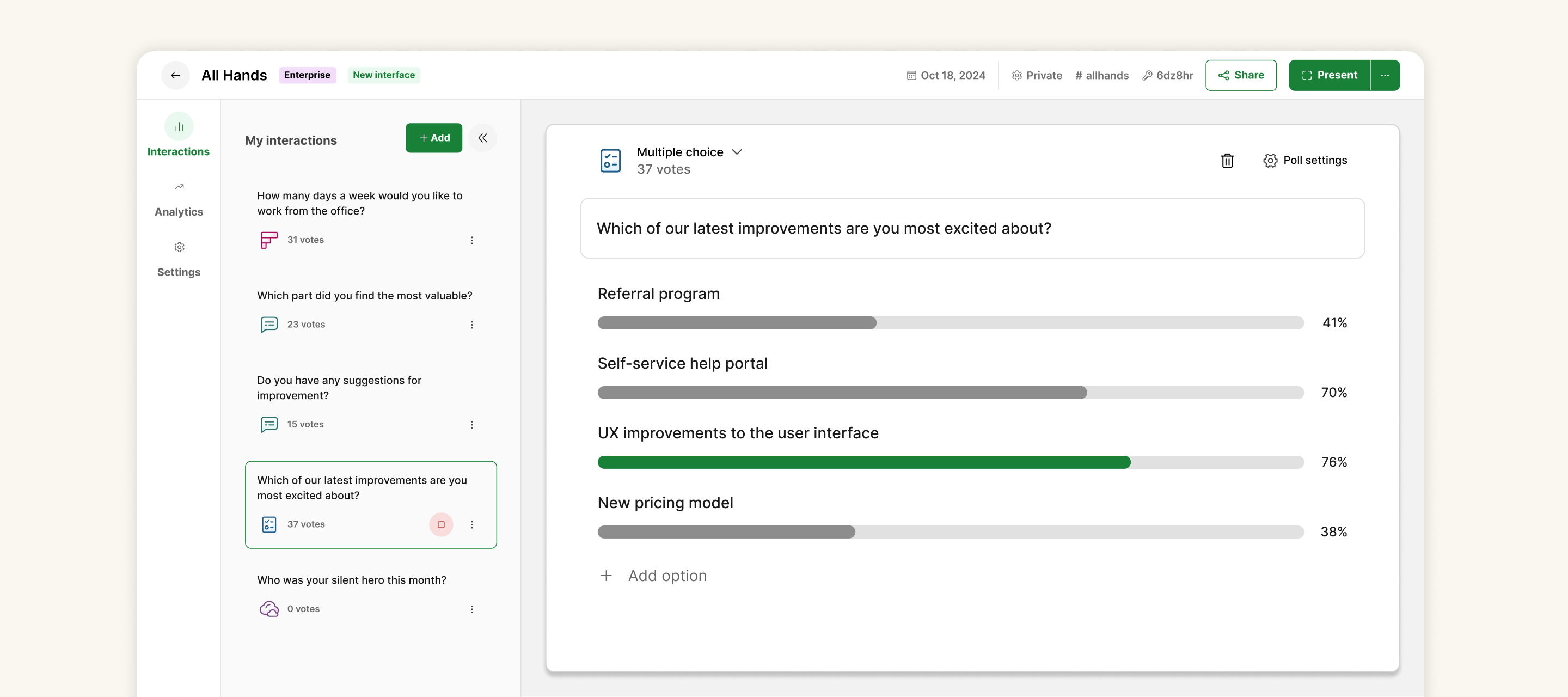
The new Slido interface is testament to our commitment to a better experience for our hosts and attendees. Our user-centric and innovative design has a sleek and modern look that should enable you to create your Slido’s faster 🚀.Presentations and events are fast-paced, and the way we work has changed in recent years, so engaging your audience has never been more important. Whether you’re running a corporate meeting, webinar, or even a lecture, maintaining your attendees attention is the key to success.Now, with the introduction of the improved Slido interface, we’ve made it easier for presenters and participants to engage with each other. Slido’s new interface becomes permanent for all users on May 27, 2025 🚀What’s New:Creating a Slido Slido Q&A Slido Settings Managing Interactions Analytics Creating a SlidoThe new interface centralizes interaction options, allowing users to add polls, Q&A sessions and quizzes as interactions in fewer clicks. These option
We’re halfway through the year, and Slido's improvements just keep on coming! ☀️Here are just a few of the fresh updates you'll find! 😎🤖 AI Quizzes now available for users on Basic plan We're bringing the power of AI to quizzes! Presenters using Slido for PowerPoint or Google Slides can now generate quizzes on their favorite topics in just a few clicks. Simply type in your topic, hit Generate questions and voilà! Feel free to customize the questions or use them as they are. Using AI quiz in Slido for PowerPointThis AI quiz feature is now accessible to users with Basic plan within the Slido for PowerPoint and Slido for Google Slides integrations. 📁 Bulk actions for polls in new SlidoAs part of our commitment to feature continuity in the new interface, we’re bringing back some of the outstanding features from the old design. You can now manage your polls at ease and merge them into a survey, or reset, duplicate, and delete several polls at once. Bulk actions in polls 🌍 Slido now sp
Slido’s new interface became permanent for all users on May 27, 2025 🚀 If you were using our older interface before, watch our training session below and learn everything you need to know. The recording includes:The motivation behind the interface redesign A tour through Slido’s new look & the biggest changes Our best practices during an engaging live demo Questions from the audience Additional resources: Want to download the slides from the training?Find them attached below 😎
May has been a busy month for our teams at Slido and we’re excited to share what we’ve been up to 💚 See the latest updates below, plus learn a little bit about what’s to come 😉 📣 A new Slido interface is on the way We’ve been designing a brand new interface for our users and it’s finally ready to be released. Sign up for a training session to learn all about it! Slido’s new and improved interface Why the change? We wanted to simplify things for our users. So we went to work designing a more intuitive experience that focused on ease of use, efficiency, and productivity. New users can now create slidos 30% faster than before! What else should I know?The new interface is gradually rolling out to all users starting in June See our recent Community post to learn more We’re offering a series of trainings throughout the next few months – and we encourage anyone and everyone to sign up And in other news... 🔴 Red dot notifications for Slido in Microsoft Teams Slido for Microsoft Teams no
Slido’s new interface became permanent for all users on May 27th, 2025 🚀 Although the new interface may look a little different, its design provides an easier, quicker, and more intuitive experience. See below for answers to the most common questions regarding the changes. Where do I create my polls? How do I save my polls? Where is my Q&A? What is the control bar for? How do I adjust my quiz timer? Can I still test my Slido as a participant? Has the participant experience changed? Does new Slido have all the same features? Where can I find help? Where do I create my polls?All polls and Q&A are now listed under My interactions on the left side. Create your polls by selecting the + Add option and choosing your poll type. Create your polls How do I save my polls?Slido polls now save automatically after a few seconds. You can also save immediately by hitting return – or by clicking anywhere outside of the text box. Polls save automatically Surveys are a bit different. Because
You can now make questions mandatory to answer when sharing Surveys with your audience! Here’s how you can set it up in Slido admin 👉Go to your Polls and open up or create a Survey. On the right hand side, simply toggle on Required question for those questions that you’d like to make mandatory for your participants to answer. Activate the Survey and share your event or the link to the Survey with your audience. And here’s what your audience will see 👉If someone tries to submit the survey while skipping required questions, Slido will automatically highlight the ones that are mandatory in red and won’t let them send their answers until all of them are filled in. That’s it! You can pick and choose which questions you’d like to make mandatory to answer, or even make all of them required. We see many clients using required questions for collecting feedback after strategic meetings, such as all-hands or quarterly reviews. This is to make sure that they collect the opinions of even tho
Already have an account? Login
Enter your E-mail address. We'll send you an e-mail with instructions to reset your password.